Description
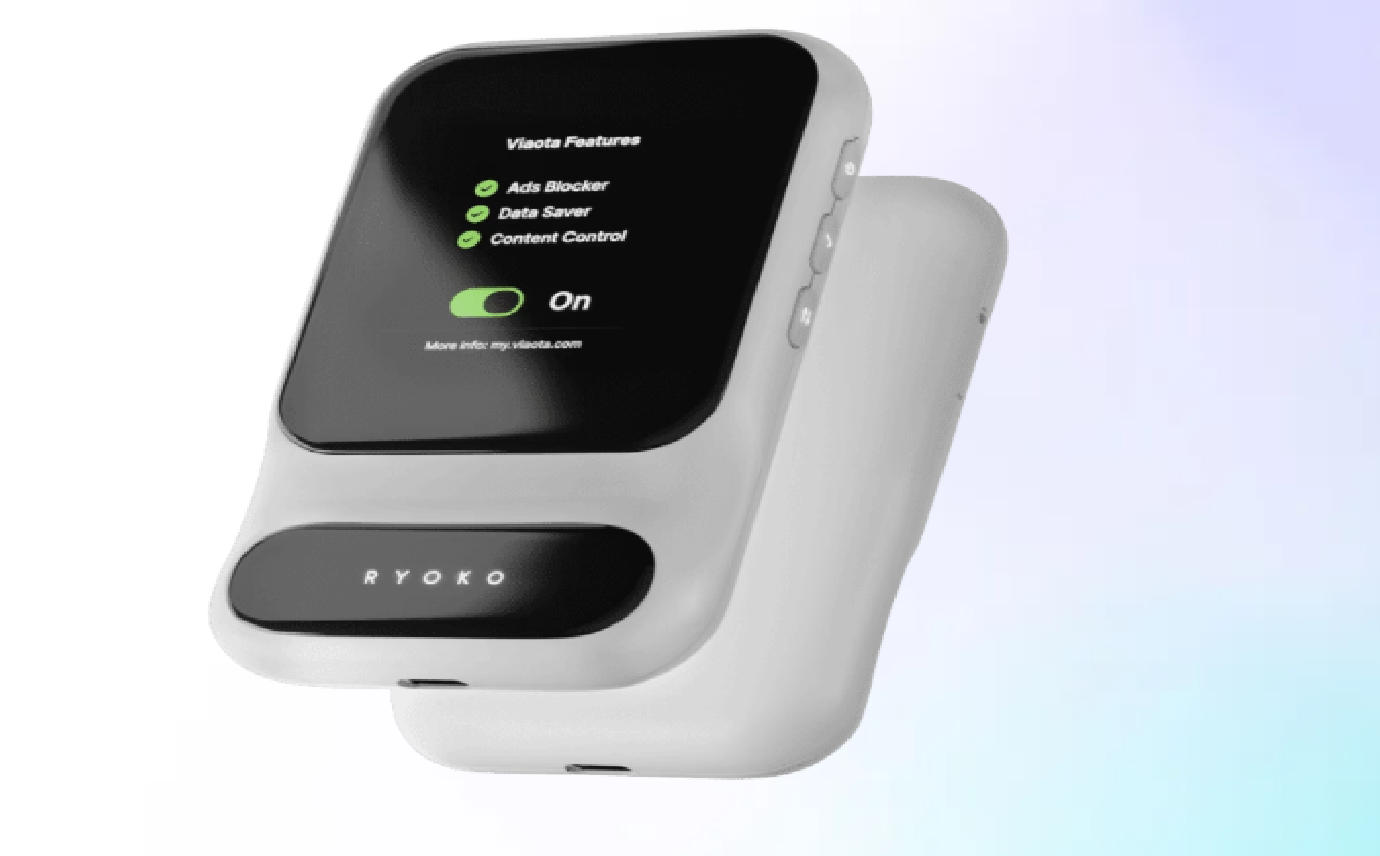
Ryoko PRO Wifi Router Unlimited Data
The Ryoko PRO Wifi Router offers a revolutionary solution for reliable internet connectivity anywhere in the world. This compact yet powerful device creates a secure private WiFi hotspot using 4G LTE technology, providing seamless connectivity across 75+ countries without the hassle of changing SIM cards or incurring excessive roaming charges. Whether you’re a frequent traveller, remote worker, or simply need a dependable internet backup, the Ryoko PRO combines portability, security, and ease of use in one sleek package.
What Is Ryoko PRO Wifi Router Unlimited Data?
The Ryoko PRO Wifi Router is an innovative portable connectivity solution that leverages virtual SIM technology to provide internet access without physical SIM card swapping. This SIM-free device delivers worldwide coverage across more than 75 countries, making it an ideal companion for international travellers and digital nomads alike.
Unlike traditional mobile hotspots that require purchasing local SIM cards in each destination, Ryoko PRO uses advanced technology to automatically connect to the best available local network. This eliminates the need to research and purchase local data plans when crossing borders, saving both time and money.
The “Unlimited Data” aspect refers to the capability of the device to support unlimited data plans when paired with compatible service providers. While the device comes with a preloaded starter SIM offering initial data allowance, users can choose from various data packages based on their specific needs and travel destinations.
The Ryoko PRO stands out in the portable router market due to its focus on simplicity and global coverage. It functions essentially as a personal WiFi bubble that travels with you, maintaining consistent internet access regardless of your location. This reliability makes it particularly valuable for professionals who cannot afford connectivity interruptions or travellers venturing into areas with limited public WiFi options.
How Does Ryoko PRO Wifi Router Unlimited Data Work?
Network Connection
The Ryoko PRO utilises advanced 4G LTE technology to automatically scan and connect to the strongest available local network in your current location. The device intelligently selects between multiple carrier options to ensure optimal connectivity without any manual configuration required.
Data Transmission
Once connected to a local network, the Ryoko PRO establishes a secure WiFi hotspot that can be accessed by up to 10 devices simultaneously. This includes smartphones, laptops, tablets, and any other WiFi-enabled devices, making it ideal for both individual users and small groups.
User Access
Users simply connect to the Ryoko PRO’s WiFi network using the credentials provided on the device. The connection is protected by WPS security protocols, ensuring that your data remains private even when accessing the internet in public locations.
The technical sophistication of the Ryoko PRO lies in its ability to function seamlessly across borders. When travelling internationally, the device automatically switches to the appropriate local network upon arrival in a new country, without requiring any user intervention. This is accomplished through either the preloaded virtual SIM technology or a user-inserted physical SIM card if preferred.
The unlimited data capability depends on the specific data plan chosen. While the device itself can support unlimited data transmission, the actual data limits will be determined by the plan purchased from Ryoko or compatible third-party providers. This flexibility allows users to select plans that best suit their usage patterns and budget considerations.
Ryoko PRO Wifi Router Main Features
Intelligent Network Switching
The Ryoko PRO continuously monitors available networks and automatically switches to the strongest local connection. This ensures consistent connectivity even when moving between different coverage areas, eliminating the frustration of manual network selection or unexpected disconnections.
Integrated Security Protection
Built-in ad-blocking and anti-phishing technology provides an additional layer of security beyond standard WiFi encryption. This proactive protection helps prevent malware infections and unwanted tracking, particularly valuable when connecting in unfamiliar locations or public spaces.
High-Speed Performance
With maximum speeds of up to 150 Mbps, the Ryoko PRO delivers sufficient bandwidth for video conferencing, streaming, and general internet browsing. While actual speeds depend on local network conditions, the device optimises connection quality to provide the best possible performance.
Wire-Free Design
The compact form factor combined with USB-C fast charging capability makes the Ryoko PRO truly portable. The device can be quickly recharged using standard USB chargers, power banks, or laptop ports, providing flexibility for extended use while travelling.
These core features work in concert to deliver a seamless internet experience regardless of location. The combination of technical performance and user-friendly design makes the Ryoko PRO particularly well-suited for professionals who require reliable connectivity without the complexity of configuring multiple devices or managing different SIM cards for international travel.
Data Plans and Unlimited Usage Details
Understanding the data plans available for the Ryoko PRO is essential for maximizing its value. The device comes with a preloaded SIM offering 500 MB of starter data, allowing immediate use upon activation. This initial allocation provides sufficient data for basic setup and limited browsing while you determine your ongoing needs.
For continuous usage, especially for data-intensive activities like video streaming or large file transfers, additional data plans are required. The term “unlimited data” refers to the capability of the device to support unlimited data plans from compatible providers, rather than an inherent unlimited data feature of the device itself.
When purchasing directly from the official Ryoko website, several data plan options are typically available:
- Daily passes for short-term intensive use
- Weekly plans ideal for vacation or business trips
- Monthly plans for regular travellers or primary internet use
- Regional-specific plans offering optimized pricing for particular areas
Starter Data
Included with device purchase for immediate connectivity
Countries Covered
Global coverage spanning major travel destinations
Roaming Charges
Eliminate traditional roaming fees by using local networks
A key advantage of the Ryoko PRO is its ability to avoid traditional roaming charges by connecting directly to local networks in each country. This can result in significant cost savings compared to standard mobile phone data roaming, particularly for frequent international travellers.
When selecting a data plan, it’s important to verify the specific definition of “unlimited” as some providers may implement fair usage policies or speed throttling after certain thresholds. For truly heavy data users, checking the terms and conditions of available plans is recommended to ensure they align with expected usage patterns.
Setting Up Ryoko PRO Wifi Router
Power Up the Device
Use the included USB-C cable to charge the Ryoko PRO. The device can be charged from any standard USB power source including wall adapters, power banks, or laptop ports. A full charge typically takes approximately 2-3 hours from empty.
Activate SIM Connection
The Ryoko PRO comes with a preloaded virtual SIM that activates automatically upon first use. If you prefer to use your own physical SIM card, insert it into the designated slot. For the preloaded SIM, no physical insertion is required.
Connect Your Devices
Turn on the Ryoko PRO by pressing and holding the power button until the LED indicator lights up. On your smartphone, tablet or laptop, scan for available WiFi networks and select the Ryoko network. Enter the password printed on the sticker on the battery compartment.
Verify Connection
Once connected, open a web browser to confirm internet access. The Ryoko PRO should automatically connect to the best available local network. The LED indicator will show signal strength and connection status.
One of the most appealing aspects of the Ryoko PRO is the simplicity of its setup process. The entire procedure typically takes less than two minutes from unboxing to active internet connection, making it substantially more convenient than configuring traditional routers or dealing with local SIM card purchases when travelling.
For advanced configuration, users can access the device’s web interface by connecting to the Ryoko network and navigating to 192.168.0.1 in a web browser. This administrative panel allows customization of network name, password, security settings, and data usage monitoring. However, for most users, the default configuration provides an optimal balance of security and convenience without requiring any technical adjustments.
Using Ryoko PRO Wifi Router: Daily Operation
The day-to-day operation of the Ryoko PRO Wifi Router is designed to be straightforward and hassle-free, requiring minimal user intervention. Once the initial setup is complete, using the device becomes a matter of simple routine.
To begin using the Ryoko PRO, simply press the power button to turn on the device. Within approximately 30-60 seconds, the router will automatically scan available networks and establish a connection to the strongest local signal. The LED indicator provides visual confirmation of power status and signal strength, with different colours indicating connection quality.
Once powered on, the Ryoko PRO creates a personal WiFi hotspot that can be accessed by your devices. If you’ve previously connected a device to the Ryoko network, it will typically reconnect automatically when in range. For new devices, you’ll need to select the Ryoko network from available WiFi options and enter the password (found on the device sticker).
During active use, the Ryoko PRO manages network selection and switching automatically. If you’re moving between areas with different network providers, the device will seamlessly transition to maintain optimal connectivity without requiring user input. This is particularly valuable when travelling through areas with variable coverage or crossing borders between countries.
Monitor Battery Status
The LED indicator shows remaining battery life. When battery is low, connect the USB-C cable to recharge without interrupting internet service.
Check Connection Quality
LED colour indicates signal strength: blue for excellent, green for good, yellow for fair, and red for poor connection.
Manage Connected Devices
Through the web interface, you can view and manage devices connected to your network, prioritizing bandwidth for important tasks when needed.
For extended trips or heavy usage days, carrying a portable power bank is recommended to recharge the Ryoko PRO when wall outlets aren’t readily available. The device can continue operating while charging, ensuring uninterrupted connectivity even during recharge cycles.
Portability and Battery Life
The Ryoko PRO Wifi Router excels in portability, making it an ideal companion for travellers and mobile professionals. Weighing approximately 100 grams and measuring roughly the size of a credit card in width and length (though thicker), the device easily fits into pockets, purses, or small bags without adding significant bulk or weight to your travel essentials.
This compact design doesn’t compromise on battery performance. The Ryoko PRO features a robust lithium-ion battery that delivers up to 8 hours of continuous use on a single charge under typical usage conditions. This duration can vary based on several factors:
Signal Strength
In areas with weak cellular coverage, the device works harder to maintain connection, potentially reducing battery life by 20-30%.
Connected Devices
Each additional device connected to the Ryoko PRO increases power consumption. Ten simultaneous connections may reduce battery life by up to 25%.
Data Usage
Heavy data activities like video streaming or large file downloads require more power than simple web browsing or email checking.
Environmental Conditions
Extreme temperatures (particularly heat) can impact battery efficiency. The device performs optimally between 10-30°C (50-86°F).
The USB-C charging capability offers significant advantages for travellers. Fast charging technology allows the device to reach approximately 80% battery capacity in just one hour when using compatible chargers. The universal USB-C format means you can use the same charger for your smartphone, tablet, and Ryoko PRO, reducing the number of cables needed while travelling.
For users planning extended periods away from power sources, the Ryoko PRO can be paired with a standard portable power bank to multiply its operational time. A typical 10,000mAh power bank can recharge the Ryoko PRO approximately 3-4 times, potentially extending total usage time to 24-32 hours before requiring wall outlet access.
Network Security and Privacy Features
In an era of increasing digital threats, the Ryoko PRO Wifi Router prioritizes security and privacy protection. Unlike public WiFi networks that expose users to potential data interception and security breaches, the Ryoko PRO creates a private, encrypted connection that significantly reduces vulnerability to common cyber threats.
At the core of the Ryoko PRO’s security framework is WPS (WiFi Protected Setup) technology, which implements strong encryption protocols to protect data transmitted between connected devices and the internet. This creates a secure tunnel for your information, making it exceptionally difficult for malicious actors to intercept sensitive data like login credentials, financial details, or personal communications.
Beyond basic encryption, the Ryoko PRO incorporates advanced security features that are typically found only in premium home routers:
- Integrated ad-blocking technology that filters out intrusive advertisements and potential malvertising threats
- Anti-phishing protection that helps identify and block access to known fraudulent websites
- Malware screening that examines web traffic for potential threats before they reach your devices
- Network isolation that prevents connected devices from accessing each other without permission
The security features of the Ryoko PRO provide peace of mind when accessing sensitive information on public networks. I regularly conduct banking transactions and access client data while travelling, and knowing my connection is private and protected is invaluable.
— James R., Business Consultant
The device’s web interface provides additional security controls, allowing users to customize security settings, view currently connected devices, and monitor for unauthorized access attempts. This administrative control panel can be accessed through any connected device by navigating to the router’s IP address in a web browser.
For privacy-conscious users, the Ryoko PRO offers an additional advantage: by creating your own private network rather than connecting to hotel, airport, or café WiFi, you avoid potential tracking and data collection that commonly occurs on public networks. This ensures your browsing habits and online activities remain confidential, an increasingly important consideration for both personal and professional internet use.
Benefits for Remote Workers and Travellers
Worldwide Connectivity
With coverage in over 75 countries, remote workers can maintain productivity regardless of location. The automatic network selection eliminates the need to research local providers or purchase SIM cards in each destination, saving valuable time and reducing travel stress.
Reliable Workstation Setup
The Ryoko PRO enables consistent internet access even in locations with limited infrastructure. Digital nomads can establish temporary offices in remote villages, beachside bungalows, or mountain retreats while maintaining professional connectivity for video calls and file transfers.
Enhanced Security
Avoiding public WiFi networks significantly reduces exposure to potential security threats. This is particularly valuable when accessing company systems, handling client information, or conducting financial transactions while travelling.
Cost Predictability
With predetermined data plans, travellers can accurately budget for connectivity costs without fear of unexpected roaming charges. This transparency is especially valuable for freelancers and self-employed professionals managing business expenses.
For business travellers, the Ryoko PRO offers significant advantages beyond convenience. The ability to establish an immediate, secure connection upon arrival at a destination means no productivity downtime waiting for hotel WiFi credentials or dealing with unreliable public networks. This seamless transition is particularly valuable for time-sensitive work or scheduled virtual meetings.
Adventure travellers and tourists also benefit from the device’s capabilities. The Ryoko PRO enables sharing experiences in real-time through social media or video calls even from remote locations. It also provides reliable access to navigation services, translation tools, and travel information without relying on spotty cellular data or expensive international roaming plans.
The elimination of SIM-swapping between countries represents perhaps the most significant advantage for frequent international travellers. Traditional approaches require purchasing, registering, and configuring local SIMs in each new country – a process that can be time-consuming, confusing, and sometimes impossible due to language barriers or identification requirements. The Ryoko PRO removes this friction entirely, providing continuous connectivity across borders without interruption.
Benefits for Families and Groups
The Ryoko PRO Wifi Router offers significant advantages for families travelling together or groups needing shared internet access. With the capability to connect up to 10 devices simultaneously, the Ryoko PRO eliminates the need for multiple data plans or individual hotspots, providing a cost-effective connectivity solution for everyone.
For family holidays, the device ensures that all family members can stay connected without competing for limited hotel WiFi bandwidth or incurring excessive data roaming charges on individual mobile plans. Parents can manage children’s internet access through a single device while ensuring everyone has sufficient connectivity for their needs – from navigation and translation apps to social media sharing and entertainment streaming.
Simplified Connectivity Management
A single device handles internet access for the entire group, eliminating the need to share multiple WiFi passwords or manage separate connections.
Shared Data Costs
One data plan covers everyone’s needs, typically at a lower total cost than individual roaming charges or separate SIM purchases would entail.
Centralized Security
All group members benefit from the Ryoko PRO’s enhanced security features, protecting even less tech-savvy travellers from common online threats.
Business teams travelling for conferences, meetings, or retreats particularly benefit from the Ryoko PRO’s capabilities. The device facilitates seamless collaboration by ensuring all team members have reliable access to shared documents, communication platforms, and company resources regardless of location. This maintains productivity during business travel without relying on unpredictable hotel or venue internet services.
For tour groups or educational excursions, the Ryoko PRO enables tour guides or instructors to share a reliable internet connection with participants. This supports real-time information access, digital learning materials, and communication capabilities even in remote locations or when moving between sites.
The device’s web interface allows for basic network management, including monitoring connected devices and setting usage priorities if needed. While not offering comprehensive parental controls, basic management features allow group leaders or parents to maintain oversight of connectivity usage and ensure fair distribution of bandwidth among multiple users.
Pros of Ryoko PRO Wifi Router Unlimited Data
Extensive Global Coverage
With service in over 75 countries across six continents, the Ryoko PRO offers truly worldwide connectivity. This extensive coverage makes it suitable for international business travellers, digital nomads, and global tourists alike, eliminating connectivity concerns when crossing borders.
Robust Security Features
The combination of WPS encryption, integrated ad-blocking, and anti-phishing protection creates a comprehensive security environment that exceeds most portable hotspot offerings. This multi-layered approach safeguards sensitive information and provides protection against common cyber threats.
Exceptional Battery Performance
The 8-hour battery life with fast USB-C charging capability provides sufficient power for a full workday or travel day without requiring constant access to power outlets. The ability to charge from standard power banks further extends potential usage time in remote locations.
User-Friendly Design
The plug-and-play functionality with minimal setup requirements makes the Ryoko PRO accessible even to less technically inclined users. The automatic network selection eliminates the need for manual configuration when changing locations or crossing borders.
Another significant advantage is the device’s broad compatibility with virtually any WiFi-enabled equipment. From laptops and smartphones to tablets, e-readers, smart watches, and even certain cameras and gaming devices – the Ryoko PRO can provide internet connectivity to a diverse range of technology. This eliminates the need for device-specific data plans or compatibility concerns.
For business users, the Ryoko PRO offers excellent value through predictable data costs and the elimination of excessive roaming charges. The ability to connect multiple devices simultaneously also means team members can share a single connection during meetings or collaborative work sessions, potentially reducing overall connectivity expenses for organisations.
The compact physical design combined with durable construction makes the Ryoko PRO highly resistant to the rigours of frequent travel. Unlike some portable technology that sacrifices durability for size, the Ryoko PRO maintains a balance between portability and resilience, with components designed to withstand the inevitable bumps and minor impacts associated with regular travel use.
Cons of Ryoko PRO Wifi Router Unlimited Data
While the Ryoko PRO Wifi Router offers numerous advantages, potential buyers should be aware of certain limitations before making a purchase decision. Understanding these constraints helps set realistic expectations and determine whether the device aligns with specific connectivity needs.
Data Plan Dependencies
The “unlimited data” marketing can be somewhat misleading, as the device itself doesn’t provide unlimited data inherently. The unlimited capability depends entirely on the specific data plan purchased from Ryoko or compatible providers. Many plans advertised as “unlimited” may still include fair usage policies that throttle speeds after certain thresholds.
Speed Limitations
The maximum theoretical speed of 150 Mbps is sufficient for most applications, but falls short of what modern home broadband or 5G networks can deliver. For users requiring extremely high-bandwidth applications like 4K video editing or large-scale cloud computing, the 4G LTE technology has inherent limitations.
Battery Constraints
While the 8-hour battery life is adequate for typical daily use, power-intensive users may find this insufficient for extended workdays without access to charging options. Heavy data users, particularly those streaming video or conducting video conferences, may experience faster battery depletion.
The chart represents a balanced assessment of the Ryoko PRO’s performance across key metrics, highlighting both strengths and limitations.
Network coverage can be another limitation in certain scenarios. While the Ryoko PRO’s automatic network selection works well in most populated areas, users travelling to extremely remote regions or developing countries with limited telecommunications infrastructure may still encounter connectivity challenges. The device can only connect to networks that exist, and no portable router can overcome fundamental infrastructure limitations in truly remote areas.
From a cost perspective, the initial purchase price plus ongoing data plans may represent a significant investment compared to occasional use of local SIM cards for infrequent travellers. The value proposition is strongest for regular international travellers who can amortize the device cost across multiple trips and benefit from the convenience and time savings.
Customer Reviews and Real-World Experiences
Real-world feedback from Ryoko PRO users provides valuable insights into the device’s performance across diverse usage scenarios. Customer reviews consistently highlight several key aspects of the experience, helping prospective buyers understand how the router performs beyond manufacturer specifications.
Business Travel Reliability
“The connection was consistently fast and reliable, even when I was presenting to clients from a remote cabin. No more stressing about hotel WiFi dropping during important calls!”
— Sophia N., Management Consultant
Adventure Travel Connectivity
“Took my Ryoko PRO on a three-week backpacking trip across Southeast Asia. Battery life exceeded expectations and I always had signal even in smaller towns where friends with local SIMs struggled.”
— David T., Travel Blogger
Family Holiday Experience
“We connected all our family devices with no slowdowns. The kids could stream videos while my husband and I planned activities online. The ad-blocking was a pleasant surprise that kept inappropriate content away.”
— Maria K., Parent
Analysis of customer feedback across multiple platforms reveals several consistent themes. The ease of setup receives nearly universal praise, with most users reporting successful connections within minutes of unboxing. The automatic network selection functionality proves particularly valuable in areas with multiple available networks of varying quality, as the device reliably identifies and connects to the strongest option.
Battery performance reviews are generally positive, though vary based on usage patterns. Users report approximately 6-8 hours of typical use, aligning with manufacturer claims. Heavy data users note somewhat shorter durations, particularly when streaming video or conducting extended video conferences.
The security features receive strong positive feedback, especially from business users and privacy-conscious travellers. Many reviews specifically mention the peace of mind provided by not having to use public WiFi networks in hotels, airports, or cafes. The integrated ad-blocking functionality earns particular appreciation for improving browsing experience and reducing unwanted interruptions.
Some criticism appears in reviews regarding speed consistency, with occasional users reporting slower-than-expected connections in certain locations. However, these comments typically acknowledge that such limitations likely reflect local network infrastructure rather than deficiencies in the Ryoko PRO itself.
Any Side Effects or Risks?
When evaluating any technology product, particularly one that uses wireless signals and will be kept in close proximity to users for extended periods, potential side effects or risks are natural concerns. Based on comprehensive research and user reports, the Ryoko PRO Wifi Router presents minimal health or safety concerns when used as directed.
Like all WiFi devices, the Ryoko PRO emits radio frequency (RF) electromagnetic radiation while operating. However, these emissions fall well within internationally recognized safety standards established by regulatory bodies such as the International Commission on Non-Ionizing Radiation Protection (ICNIRP) and various national telecommunications authorities. The radiation levels from portable WiFi routers like the Ryoko PRO are significantly lower than those from mobile phones and pose no known health risks based on current scientific evidence.
From a technical perspective, the primary “side effect” users should be aware of relates to data security and usage monitoring. While the device itself incorporates robust security features, users should remain vigilant about:
- Monitoring data usage to avoid unexpected charges or throttling on limited plans
- Keeping the device firmware updated to maintain security protections
- Using strong, unique passwords for the WiFi network to prevent unauthorized access
- Being aware of local regulations regarding WiFi use in different countries
Reported Health Incidents
No verified health-related incidents associated with normal device use
Safety Compliance
Meets all international regulatory standards for consumer electronics
Power Output
Low RF power output well below safety thresholds
Some users have reported minor heating of the device during extended use, particularly when charging simultaneously with active data transmission. This thermal effect is normal for electronic devices and does not indicate a malfunction or safety hazard unless the heating becomes excessive. The Ryoko PRO incorporates thermal management features that prevent overheating under normal operating conditions.
From a privacy perspective, it’s worth noting that all internet activity conducted through the Ryoko PRO is subject to the same data collection practices as any internet service. While the device provides a secure connection that protects against local interception, standard online privacy considerations still apply. Users concerned about complete data privacy should consider additional measures such as using a VPN service in conjunction with the Ryoko PRO for enhanced anonymity.
Troubleshooting and Customer Support
Connection Issues
If experiencing slow or no connectivity, try the following:
- Restart the Ryoko PRO by holding the power button for 10 seconds
- Move to a different location to find stronger signal
- Check LED indicator for signal strength status
- Verify data plan is active and has available data
Battery Problems
For battery-related concerns:
- Ensure using the original USB-C cable or certified alternative
- Try different power sources (wall adapter, laptop port, power bank)
- Perform a full discharge/recharge cycle
- Check for excessive heating during charging
Device Connection
If devices won’t connect to the Ryoko network:
- Verify correct WiFi password entry
- Restart the problematic device
- Check maximum device limit (10 connections maximum)
- Reset network settings on the connecting device
For issues that persist beyond basic troubleshooting, Ryoko provides several customer support channels. The primary support resource is the comprehensive knowledge base available on the official website (getryoko.com/support). This searchable database contains detailed articles addressing common questions, setup guides, and troubleshooting procedures for specific scenarios.
Direct customer support is available through multiple channels:
| Email Support | support@getryoko.com | 24-48 hour response time |
| Live Chat | Available on website | Business hours (GMT) |
| Phone Support | Regional numbers on website | Business hours (local time) |
| Community Forum | forum.getryoko.com | User-to-user assistance |
Customers report generally positive experiences with Ryoko’s support services, particularly noting the responsiveness of email support and the detailed troubleshooting advice provided. For users experiencing persistent technical issues, support representatives can remotely diagnose device performance if granted access through the administrative interface.
The Ryoko PRO includes a standard manufacturer warranty covering defects in materials and workmanship. The specific warranty period varies by region but typically ranges from 12 to 24 months from the date of purchase. For warranty service, customers should contact support with proof of purchase and a description of the issue.
Where to Buy Ryoko PRO Wifi Router Unlimited Data?
- Guaranteed authenticity with no risk of counterfeit products
- Direct access to customer support and warranty services
- Latest model versions with current firmware
- Exclusive promotions and bundle offers not available elsewhere
- Comprehensive data plan options optimised for the device
For those who prefer to purchase through established retail channels, the Ryoko PRO is also available through select authorised online retailers including:
- Newegg
- B&H Photo Video
- Amazon (via the official Ryoko store only)
- Select regional electronics specialists
When purchasing technology products designed for international use, authenticity is paramount. Counterfeit or grey-market devices may lack proper certification for use in certain countries, potentially leading to connectivity issues or even legal complications regarding wireless transmission standards.
Warning Signs of Unauthorised Sellers
Be cautious of listings with significantly below-market pricing, missing or altered packaging, or sellers unwilling to provide verification of authorised retailer status. Legitimate retailers will clearly state their authorisation relationship with Ryoko.
Grey Market Concerns
Some retailers may offer imported versions intended for different regional markets. These units may have incompatible frequency bands for your region or lack proper local certification, potentially affecting performance and warranty validity.
If purchasing from third-party marketplaces like eBay or classified listings, exercise extreme caution. The potential cost savings rarely justify the risks of receiving counterfeit, damaged, or modified devices. Additionally, warranty service is typically unavailable for devices purchased through unauthorised channels, leaving you without recourse if technical issues arise.
Corporate or bulk purchases for business teams can be arranged through the Ryoko business sales department, which offers volume discounts, centralised billing for data plans, and enhanced support options for enterprise customers. These business packages can be customised based on specific travel patterns and data requirements.
Price and Package Inclusions
The Ryoko PRO Wifi Router represents a significant investment in portable connectivity, with pricing that reflects its advanced technology and global capabilities. Understanding the complete package inclusions and optional add-ons helps potential buyers assess the overall value proposition relative to their specific needs.
The standard Ryoko PRO package includes:
- Ryoko PRO 4G LTE WiFi router device
- USB-C charging cable (wall adapter may be included depending on region)
- Starter SIM with 500 MB initial data allowance
- Quick start guide and warranty documentation
- Protective carrying pouch
Base pricing for the Ryoko PRO typically ranges from £149-£199 (approximately $180-$240 USD), depending on current promotions and regional variations. This base price includes the hardware and starter data package but requires additional data plan purchases for continued use beyond the initial 500 MB allocation.
Starting Price
Base device with starter data package
Monthly Plans
Typical cost range for monthly data packages
Daily Passes
Cost range for short-term daily data options
Data plans are available in several configurations to accommodate different usage patterns:
| Plan Type | Typical Cost | Ideal For |
| Daily Pass | £5-15 per day | Short business trips or weekend getaways |
| Weekly Package | £25-60 per week | Vacations or medium-length business travel |
| Monthly Standard | £15-40 per month | Regular travellers or secondary home internet |
| Monthly Unlimited | £40-90 per month | Digital nomads or primary internet users |
It’s important to note that “unlimited” plans may still have fair usage policies or speed throttling after certain thresholds. Review the specific terms of any data plan to ensure it meets your requirements.
Beyond the standard package, several accessories and add-ons are available to enhance the Ryoko PRO experience:
- External battery packs optimised for the device (£30-50)
- Replacement or additional charging cables (£10-15)
- Premium protective cases (£15-25)
- Extended warranty coverage (£20-40 per additional year)
Promotional bundles frequently offer better value than purchasing components separately. Common bundles include device + data packages (saving 10-20% on data costs) or device + accessories combinations. Special offers are regularly featured on the official website, particularly during travel seasons or holiday periods.
Final Thoughts: Who Is Ryoko PRO Wifi For?
Frequent International Travellers
Those regularly crossing borders who need seamless connectivity without SIM-swapping
Digital Nomads & Remote Workers
Professionals who require reliable internet for work while travelling or living in multiple locations
Security-Conscious Internet Users
Individuals concerned about privacy risks on public WiFi who need secure connections for sensitive activities
Families & Groups Travelling Together
Multiple users who benefit from sharing a single connection rather than managing individual data plans
Those Seeking Connectivity Simplicity
Users who value plug-and-play functionality without technical configuration requirements
After examining the comprehensive features, benefits, and limitations of the Ryoko PRO Wifi Router, it’s clear that this device addresses specific connectivity needs for particular user profiles. The ideal Ryoko PRO user values global mobility, connection security, and simplicity over absolute speed or the lowest possible data costs.
For frequent business travellers, the time saved by avoiding local SIM purchases and the security benefits of private networks often justify the investment. The predictable connectivity costs also facilitate expense reporting and budgeting for professional use. Similarly, digital nomads working remotely while exploring multiple countries will find significant value in the seamless border-crossing capabilities and reliable connection for work-related tasks.
Families travelling together benefit from the ability to connect multiple devices to a single hotspot, sharing costs across several users. The integrated security features provide peace of mind for parents concerned about children connecting to unsafe networks while travelling. Adventure travellers venturing beyond urban centres appreciate the ability to maintain connectivity in areas where public WiFi is nonexistent.
However, the Ryoko PRO may not be the optimal choice for every user. Those primarily travelling within their home country might find better value in domestic data plans. Users requiring extremely high-speed connections for bandwidth-intensive applications might be better served by fixed broadband where available. Budget travellers making infrequent international trips might find local SIM purchases more economical despite the additional effort involved.
Ultimately, the Ryoko PRO excels at providing a balance of convenience, security, and global functionality that makes it an excellent investment for those who prioritize reliable connectivity across multiple international destinations. Its straightforward operation and comprehensive coverage make it particularly valuable for users who prefer a “set and forget” connectivity solution rather than researching and configuring local options at each destination.
Frequently Asked Questions (FAQs)
Can the Ryoko PRO be used without a SIM card?
No, the Ryoko PRO requires either the preloaded virtual SIM or a physical SIM card to connect to cellular networks. The device itself does not generate internet connectivity; it requires a data source via SIM technology to function properly.
Does the Ryoko PRO support 5G networks?
No, the current Ryoko PRO model supports 4G LTE networks only. While this provides sufficient speed for most applications (up to 150 Mbps), it does not offer the enhanced speeds of 5G technology. Future models may incorporate 5G capabilities as the technology becomes more widely available globally.
Are all countries covered by the Ryoko PRO’s global connectivity?
The Ryoko PRO offers connectivity in over 75 countries, covering most major travel destinations across Europe, North America, Asia, Australia, and parts of Africa and South America. However, coverage is not truly universal. Before travelling to specific destinations, particularly remote areas or developing nations, checking the coverage map on the official website is recommended.
Is the “unlimited data” truly unlimited?
The definition of “unlimited” varies by data plan provider. While some plans offer genuinely unlimited data without speed restrictions, many have fair usage policies that may throttle speeds after certain thresholds (typically 20-50GB per month). Review the specific terms of any data plan you’re considering to understand potential limitations.
Can I use my existing SIM card with the Ryoko PRO?
Yes, the Ryoko PRO has a physical SIM slot that accepts standard nano-SIM cards. If you have an existing data SIM with international roaming capabilities, it can typically be used with the Ryoko PRO. However, using the virtual SIM technology may offer better rates and convenience for international travel.
How many devices can connect simultaneously?
The Ryoko PRO supports up to 10 devices connected simultaneously. This includes any combination of smartphones, tablets, laptops, smart watches, cameras, or other WiFi-enabled devices. Performance may degrade if all connected devices are performing data-intensive tasks concurrently.
Is the Ryoko PRO suitable as a primary home internet connection?
While technically possible, the Ryoko PRO is designed primarily for travel and mobile use rather than as a permanent home internet solution. Data costs typically make it less economical than fixed broadband for heavy daily home use. However, it can serve effectively as a temporary home solution or backup internet connection.
How secure is the Ryoko PRO compared to public WiFi?
The Ryoko PRO offers significantly enhanced security compared to public WiFi networks. Its WPS encryption, ad-blocking, and anti-phishing features provide multiple layers of protection against common cyber threats. While no system is completely impervious to sophisticated attacks, the private nature of the network substantially reduces exposure to casual hacking attempts common on public networks.
For additional questions not covered here, the comprehensive knowledge base on the official Ryoko website (getryoko.com/faq) provides detailed information on technical specifications, troubleshooting procedures, and international usage guidelines. Customer support representatives are also available through multiple channels to address specific inquiries related to your particular use case or technical requirements.




Reviews
There are no reviews yet.